Team Stories
From Figma to Framer: A Designer’s Guide to Redesigning and Publishing a Website

By Samsong, Design Team Lead at SOOHO.IO.
1. Introduction
I’m Samsong, a product designer at SOOHO.IO.
Working in technology often means delivering the best possible result with limited time and resources. When several projects compete for attention, improving the way we work becomes a practical necessity.
SOOHO.IO’s website redesign gave me an opportunity to test a different approach. We moved from a Figma-centered design-to-development workflow to Framer, allowing me to take the site from design through to publication.
The change brought greater autonomy and a different set of strengths and limitations. This article compares the two workflows from a designer’s perspective and shares the lessons from using each in a real project.
2. Why the workflow needed to change
The redesign needed to express SOOHO.IO’s evolving business and identity in a rapidly changing market. It was more than a visual refresh: the site had to support the company’s position in blockchain fintech, with higher expectations for both quality and delivery speed.
I set three goals:
Use limited resources effectively
Deliver a high-quality design quickly
Make the site easy to maintain after launch
Meeting all three goals was difficult within the existing Figma-to-developer handoff. Framer offered a way for a designer to own the process from design through publication.
3. Two redesigns, two different outcomes
I have worked on two SOOHO.IO website redesigns. The first used Figma for planning and design, followed by developer implementation. In the second, I used Framer to take the site through to publication myself. Under similar time constraints, the difference in the finished result was substantial.
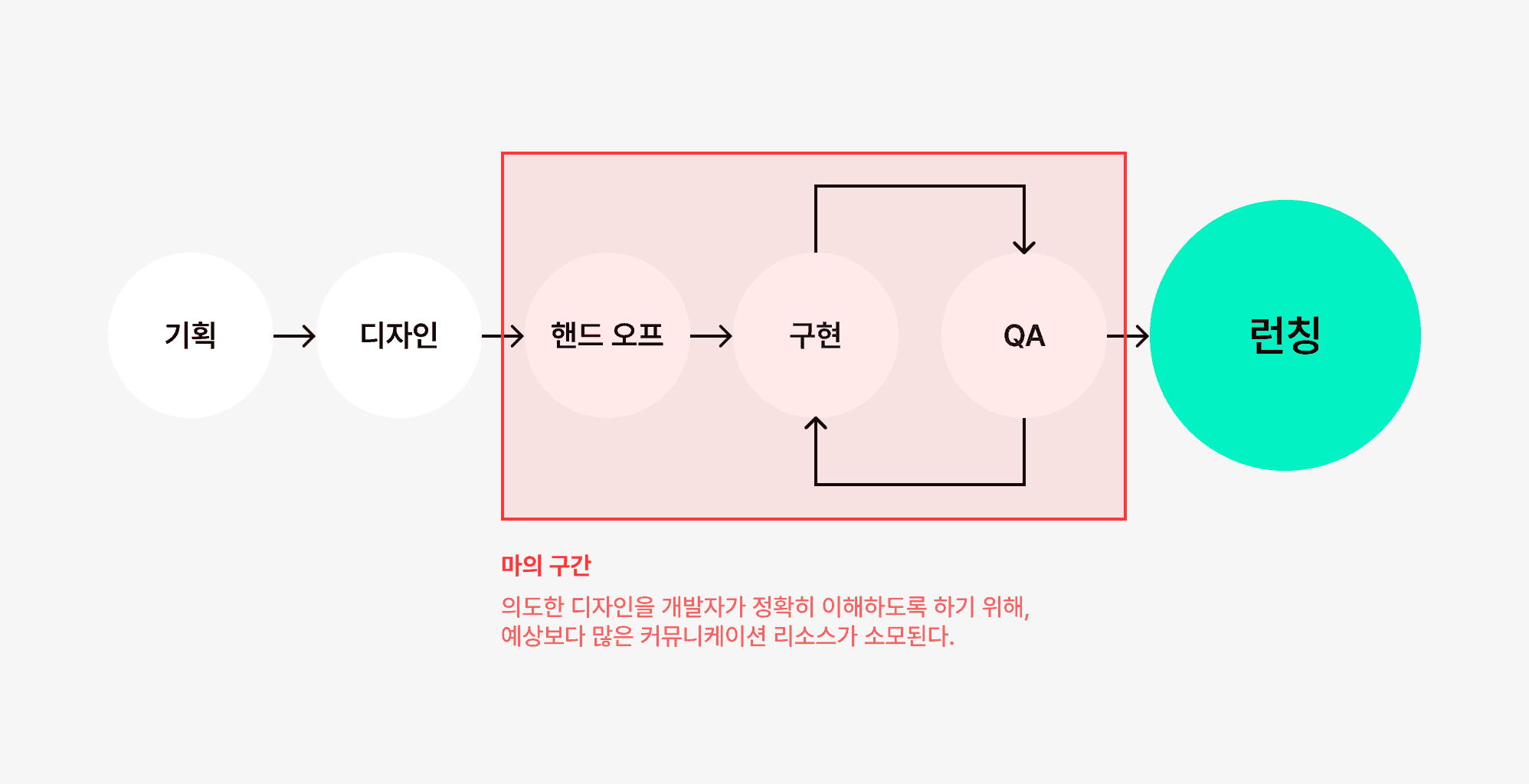
The first redesign: the limits of a handoff-based workflow
For the first project, I followed the familiar Figma workflow.
After planning and designing, I handed the work to developers. The process was structured, but tight schedules exposed several limitations.
Differences in interpretation sometimes changed or omitted parts of the intended experience.
Interactions and animations were delayed or deprioritized because of implementation effort and communication overhead.
The sequential planning, design, and development process created bottlenecks toward the end of the project, leading to compromises in the final experience.
It became difficult to carry every design intention through to what users actually saw.
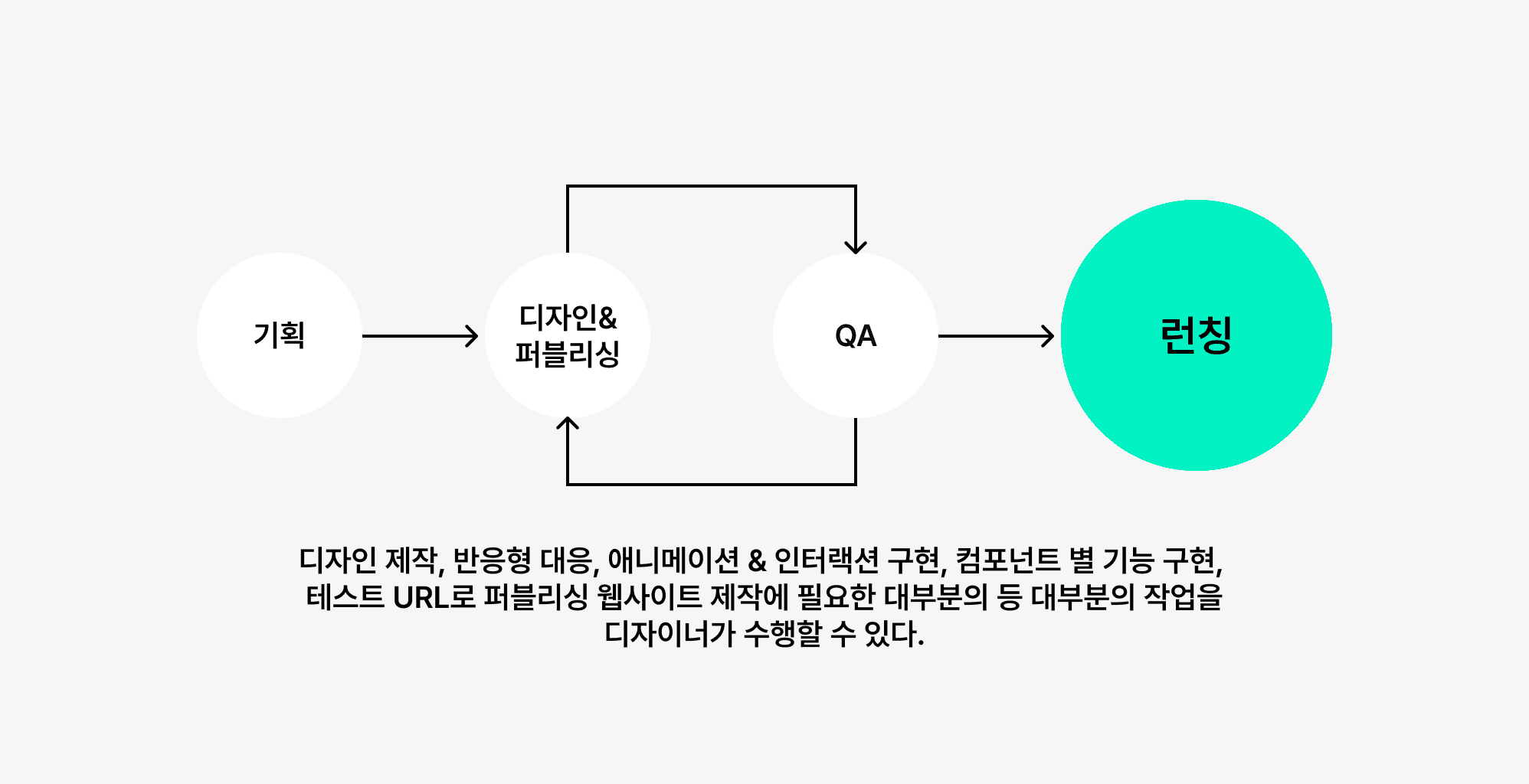
The second redesign: owning implementation in Framer
The schedule and team were still constrained, but Framer allowed design and implementation to happen together. Owning both stages made the process more flexible.
I could implement the intended interface directly.
Interactions and animations could be refined without an additional handoff.
The same resources produced a more complete result.
Routine maintenance and publication no longer depended on developer availability.
The biggest change was that the design became the final product. Beyond saving time, this gave me much greater control over the brand experience we delivered.
4. What worked well in practice
SOOHO.IO’s website communicates the company’s identity and direction. Details such as motion and interaction help convey that message. Framer let me implement those details directly and keep planning, design, and publication within one workflow.

Publishing in a single step

Responsive design across screen sizes
1. A direct path to publication
I was responsible for the page design, structure, and functionality, so being able to publish without waiting for development resources was important. Framer made it possible to implement changes and review the live result quickly.
2. Intuitive responsive design and controls
I could adjust layouts for different viewports and work directly with text and color variables. It helped me think more clearly about how the interface would behave in a browser.
3. Closer alignment between design and delivery
With the earlier workflow, there was often a small gap between the design and its implementation. In Framer, the interface I refined was the interface we shipped.
4. Faster implementation of interactions and motion
Interactions can play an important role in a brand experience, but they often require substantial development time. Framer let me build and refine them directly, helping maintain the intended quality and consistency.
5. Where Framer works well—and where it has limits
Framer is particularly useful for campaigns, event sites, landing pages, and brand-focused websites. It is also a practical choice when designers or marketers need to maintain a site without ongoing developer support.
It does not replace every design and development workflow. More complex products involving authentication, Web3 integrations, data processing, or user-specific application logic still require specialist development work.
For collaborative product design, reusable systems, and design versioning, Figma remains a strong choice. The right tool depends on the work, and understanding its limits matters as much as knowing its strengths.
6. Choosing the tool for the situation
This was my first experience taking responsibility for publication as well as design. It taught me how to balance efficiency with completeness. Figma and Framer serve different needs; the right choice depends on the project’s goals, team, and implementation scope.
✅ When to choose Figma
Building or maintaining a design system
Designing products where component reuse matters, such as B2B SaaS or mobile apps
Coordinating work across multiple designers
Preparing designs for developer implementation
✅ When to choose Framer
Launching a focused brand, campaign, or event website
Publishing directly to test an early concept quickly
Creating a portfolio or marketing site where visual detail and motion matter
Working in an early-stage team with limited development capacity
📌 Summary:
Figma is particularly strong for systematic product design and team collaboration.
Framer is particularly strong for taking a visual web experience from design to publication.
I consider the nature of the product, the importance of the brand experience, the team structure, and the implementation needs before choosing. The tools can also complement one another—for example, using Figma for a design system and Framer for a website or interactive prototype.
The lesson is to keep evaluating the workflow and trying better approaches, while being clear about when and how each tool supports the work.
Thank you.
👉 Curious about the revamped website of SOOHO.IO?: https://www.sooho.io/
SOOHO.IO Official Channels
Website: https://www.sooho.io/
X (Twitter): https://twitter.com/soohoio
LinkedIn: https://www.linkedin.com/company/sooho/